
Knowing how search engines work starts with three connected processes: crawling, indexing, and ranking. Search engine bots first discover and fetch web pages. The search engine then analyzes eligible pages and stores information about them in an index. Finally, when someone submits a search query, ranking systems retrieve relevant information and decide which results to display.
A page must pass through these stages in order. A search engine cannot rank content it has not indexed, and it normally cannot index content it cannot access or process. This guide explains the complete journey and shows you how to identify where search visibility problems begin. Google officially describes Search as a three-stage system involving crawling, indexing, and serving results, while Bing documents a similar discovery, evaluation, and ranking process.
The Search Engine Process at a Glance
A search engine is an information retrieval system. It builds and maintains a massive database of web content so that it can respond to queries without searching the entire live internet every time.
The simplified process looks like this:
Discovery → Crawling → Rendering → Indexing → Retrieval → Ranking → Search Results
| Stage | Main Question | Typical Activity |
| Discovery | Does the search engine know the URL exists? | Finding URLs through links, sitemaps, and previously known pages |
| Crawling | Can the bot access the URL? | Requesting the page from its server |
| Rendering | Can the bot see the complete content? | Processing HTML, CSS, and JavaScript |
| Indexing | Is the page suitable for storage? | Understanding content, metadata, media, and canonical relationships |
| Retrieval | Does the page match the query? | Finding potentially relevant documents in the index |
| Ranking | Which matching results are most useful? | Ordering eligible results using automated systems |
| Presentation | How should the answer appear? | Displaying links, snippets, images, local results, or other features |
Although people often combine retrieval and ranking into one stage, the distinction is useful. Retrieval creates a group of possible results. Ranking determines their order and presentation.
Google notes that not every discovered page is crawled, not every crawled page is indexed, and not every indexed page appears for a particular query. Following technical guidelines improves eligibility, but it does not guarantee crawling, indexing, or rankings.
How Search Engines Work? Explained
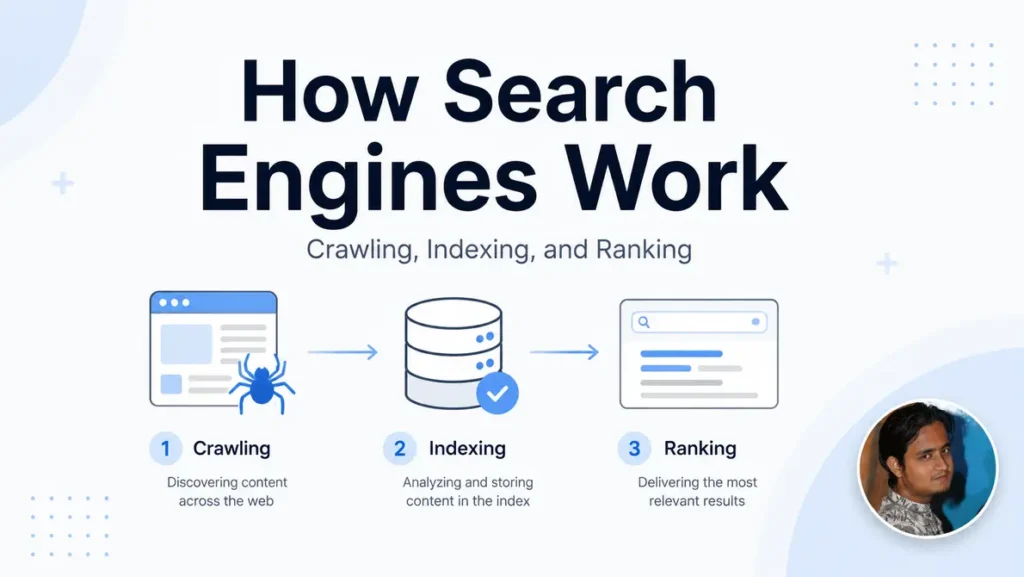
Search engines discover, organize, and rank web content through three core processes: crawling, indexing, and ranking, so users can find the most relevant answers to their queries.
1. Crawling: How Search Engine Bots Discover Web Pages
Crawling is the process of discovering URLs and requesting their content. Automated programs called crawlers, spiders, robots, or bots move between pages and collect information for further processing.
Google’s primary web crawler is Googlebot. Bing uses Bingbot. These crawlers begin with URLs the search engine already knows and discover additional pages by following links, reading XML sitemaps, and revisiting previously crawled content.
How Search Engines Discover New URLs
Search engines commonly discover new pages through:
- Crawlable internal links from existing pages
- Backlinks from other websites
- XML sitemaps
- Previously visited URLs
- Redirect destinations
- URL submission and inspection tools
- Links found in rendered HTML
Internal links are especially important because they connect your content into a navigable structure. Google generally expects crawlable links to use an HTML <a> element with an href attribute. Script-controlled elements that behave like links may not provide the same reliable discovery path.
An XML sitemap supplies a list of URLs you consider important. It can help a search engine crawl a website more efficiently, particularly when the site is large, new, frequently updated, or weakly connected through internal links. However, sitemap inclusion is a discovery signal, not an indexing guarantee.
What Happens When a Bot Visits a URL?
The crawler sends an HTTP request to the server hosting the page. The server then returns a response that may include:
- An HTML document
- A redirect
- A client or server error
- A blocked or unauthorized response
- Supporting resources such as scripts and images
The HTTP status code helps the crawler interpret the response. A 200 response normally indicates that the request succeeded. A permanent redirect points the crawler toward another URL, while a 404 or 410 indicates that the requested resource is unavailable.
Search engine bots also check crawling instructions. A robots.txt rule can prevent a compliant crawler from requesting a URL, but it should not be treated as a dependable method for removing an already known URL from search results. If you need to prevent indexing, an index-control directive such as noindex must be visible to the crawler, which means the crawler generally needs permission to access the page.
2. Rendering: Where JavaScript Enters the Process
Modern websites often use JavaScript to generate text, navigation, product information, and interactive page elements. Consequently, downloading the initial HTML may not reveal everything a user sees.
Rendering is the process of executing page resources and producing the final document representation. Google describes JavaScript processing through three connected phases: crawling, rendering, and indexing. Googlebot first fetches the URL, extracts available links, queues the page for rendering, executes supported JavaScript, and then processes the rendered HTML.
JavaScript SEO problems may occur when:
- Important content appears only after a failed script runs
- Required JavaScript files are blocked
- Links do not contain crawlable href attributes
- Content depends on user actions such as scrolling or clicking
- The server returns an empty application shell
- Rendering requires unavailable APIs or authentication
- Canonical tags change unexpectedly after rendering
A practical approach is to place essential content and navigation in the server response whenever possible. JavaScript can still support the experience, but your main information should not depend on a fragile rendering sequence.
3. Indexing: How Search Engines Understand and Store Content
Indexing begins after a search engine has crawled and processed a page. During this stage, the system analyzes the page to determine what it contains, which version should represent it, and whether it is suitable for the search engine’s index.
Google states that its indexing process may analyze textual content, images, videos, title elements, alt attributes, metadata, language, location signals, and page usability. It also evaluates whether the page duplicates another URL.
The search engine may consider questions such as:
- What is the main topic?
- Which entities, concepts, and relationships appear?
- What search intent could the page satisfy?
- Is the content substantially different from known pages?
- Is the page blocked by an indexing directive?
- Which URL is the canonical version?
- Can the main content be rendered and interpreted?
- Does the page meet applicable quality and security standards?
Canonicalization and Duplicate Pages
Websites frequently expose similar content through multiple URLs. Parameters, print pages, filters, HTTP and HTTPS versions, or category paths can all create duplicates.
Canonicalization is the process of selecting a representative URL from a group of duplicate or closely related pages. You can indicate your preferred version through redirects, rel=”canonical” annotations, consistent internal links, and sitemap inclusion. Google treats redirects and canonical annotations as stronger signals than sitemap inclusion, but it may still select a different canonical when other signals conflict.
This distinction matters because a duplicate URL can be crawled without becoming the version stored or displayed in search results.
Why a Crawled Page May Not Be Indexed?
Common indexing issues include:
- A noindex directive
- Duplicate or near-duplicate content
- An incorrect canonical tag
- Thin or minimally useful content
- Soft 404 behavior
- Content that cannot be rendered
- Login or access restrictions
- Conflicting redirects
- Low-value automatically generated URLs
- A page Google has discovered but has not prioritized for indexing
Indexing is selective. Search engines do not have to store every page they can technically access. Google explicitly states that processing a page does not guarantee its inclusion in the index.
4. Retrieval and Ranking: How Search Engines Select Results
When a user enters a query, the search engine does not begin crawling the web. Instead, it searches its existing index for documents that may answer the request.
Retrieval identifies a candidate set of relevant pages. Ranking systems then evaluate and order those candidates. The goal is not simply to find pages containing the same keywords. Modern systems also attempt to interpret meaning, context, relationships, and probable search intent.
Google says its automated ranking systems use many factors and signals to identify useful and relevant results. These systems primarily evaluate individual pages, although site-wide signals and classifiers can also contribute to their understanding.
Potential considerations include:
- Relevance to the words and meaning of the query.
- Search intent satisfaction.
- Content usefulness and originality.
- Page and website quality signals.
- Internal and external link relationships.
- Freshness when the query requires current information.
- Language and geographic relevance.
- Mobile usability and page experience.
- The searcher’s location and device.
- Spam and safety signals.
These considerations should not be interpreted as a simple checklist of independent ranking factors. Search systems use interconnected signals, and the importance of a signal can change according to the query.
For example, freshness may matter greatly for a search about a recent algorithm update but much less for a stable definition. Location can be essential for “emergency plumber,” but nearly irrelevant for “how binary search works.”
5. A Hypothetical URL’s Journey Through Search
Consider a hypothetical article published at:
https://example.com/guides/email-security
The website’s category page links to the new article, and the URL is included in the XML sitemap.
- Discovery: A crawler finds the URL through the category link or sitemap.
- Crawling: The bot requests the page, and the server returns a 200 response.
- Rendering: The search engine processes the HTML and runs the necessary JavaScript.
- Content analysis: It reads the title tag, headings, body content, images, and metadata.
- Canonicalization: It confirms that the page points to itself as the preferred URL and does not substantially duplicate another article.
- Indexing: The system decides that the page is eligible and stores information about it.
- Retrieval: A user searches for “how to secure a business email account,” and the page enters the candidate set.
- Ranking: The engine compares it with other eligible documents and assigns it a position based on relevance, quality, context, and other signals.
- Presentation: The result may appear with a title link, snippet, date, image, or another search feature.
Now change one condition. Suppose the page contains a noindex directive. The crawler may still access and process it, but the page should not remain eligible for normal indexing.
Change another condition. Suppose the article is indexed but provides a vague answer. It may be eligible for retrieval, but it ranks below pages that satisfy the query more completely.
This example shows why “Google found my page” and “my page should rank” are not equivalent statements.
What Each Stage Means for Your SEO Strategy?
A useful SEO diagnosis begins by identifying the earliest failed stage.
| Symptom | Likely Stage | What to Check First? |
| Search engines do not know the URL | Discovery | Internal links and XML sitemap |
| Bot cannot fetch the page | Crawling | robots.txt, server errors, DNS, redirects, and access rules |
| Bot sees incomplete content | Rendering | Rendered HTML, JavaScript errors, blocked resources, and lazy loading |
| Page is crawled but excluded | Indexing | noindex, canonical tags, duplicates, content quality, and soft 404 issues |
| Page is indexed but invisible for target queries | Retrieval or ranking | Search intent, relevance, originality, authority, and competing results |
| Page ranks for the wrong terms | Content understanding | Title tag, headings, entities, internal anchor text, and topical focus |
| Rankings change between users | Search context | Location, language, device, freshness, and result type |
Here is what matters most: do not begin a ranking investigation by editing keywords when the URL is blocked from crawling. Likewise, requesting indexing repeatedly will not solve a page that offers little value or duplicates another URL.
How to Improve Crawling, Indexing, and Ranking?
Knowing how to improve each stage matters because technical access alone does not create relevance, and useful content cannot perform if search engines cannot process it.
Follow this sequence:
- Confirm that the URL is accessible: Open the page without authentication and verify that the server returns the intended status code.
- Check crawling instructions: Review robots.txt and confirm that important pages and resources are not unintentionally blocked.
- Create crawlable internal links: Link to new pages from relevant hubs, categories, navigation elements, or existing articles using descriptive anchor text.
- Maintain an accurate XML sitemap: Include canonical, indexable URLs that you want search engines to process. Remove redirected, broken, duplicate, or intentionally excluded pages.
- Inspect the rendered content: Confirm that the title, headings, main copy, images, and links appear after rendering. Pay particular attention to JavaScript-heavy templates.
- Review index controls: Check noindex directives, canonical tags, redirects, and HTTP headers.
- Strengthen the page’s purpose: Answer a specific search need clearly. Add useful explanation, evidence, examples, distinctions, or implementation guidance rather than expanding the page with filler.
- Align the title and headings with intent: Your title tag and main heading should accurately describe the page, while supporting headings should make its structure easy to understand.
- Connect the page to its topic cluster: Use relevant internal links to show how the page relates to parent topics, supporting resources, products, or services.
- Measure the result: Use Google Search Console and Bing Webmaster Tools to review crawling, indexing, impressions, queries, and search performance.
Do not make every website a crawl-budget project. Google’s advanced crawl-budget guidance is primarily intended for very large websites, rapidly changing sites, and sites with substantial numbers of discovered but unindexed URLs. For most smaller websites, maintaining an accurate sitemap, improving internal links, and monitoring indexing are more practical priorities.
How to Diagnose Search Visibility Problems?
Google Search Console provides two particularly useful views: the Page Indexing report and URL Inspection.
The Page Indexing report helps you review indexing patterns across a website. Google advises focusing on whether important URLs are indexed and whether excluded URLs are omitted for valid reasons. Duplicate pages, removed URLs, and intentionally blocked pages do not all need to be indexed.
The URL Inspection tool provides information about Google’s indexed version of a specific page. It can also test a live URL, show indexability details, display the selected canonical, present rendered output, and allow you to request indexing after meaningful changes.
Use this diagnostic order:
- Inspect the exact URL.
- Confirm whether Google knows the page.
- Review crawl permission and the latest crawl result.
- Compare the user-declared canonical with Google’s selected canonical.
- Test the live URL.
- View the rendered page and loaded resources.
- Check the Page Indexing report for a broader pattern.
- Fix the underlying issue before requesting another crawl.
- Monitor impressions and queries after indexing.
An indexing request is a notification, not a command. It does not override technical restrictions, canonicalization, quality evaluation, or ranking systems.
Top 6 Common Misunderstandings About How Search Engines Work
1. Crawling and Indexing Are Not the Same
Crawling means requesting and processing a page. Indexing means selecting and storing information about it for potential retrieval. A crawled page may remain unindexed.
2. Indexing Does Not Mean High Rankings
An indexed page is merely eligible to appear. It must still match a query and compete with other relevant results.
3. XML Sitemaps Do Not Guarantee Indexing
A sitemap helps discovery and crawling. It does not force a search engine to index every listed URL.
4. Repeating Keywords Does Not Explain the Whole Page
Keywords can help communicate a subject, but modern ranking systems also evaluate meaning, context, usefulness, and relationships. Repetition cannot compensate for weak intent alignment or thin content.
5. Crawl Budget Is Not Equally Important for Every Site
Smaller sites are usually better served by fixing internal links, duplicate URLs, server problems, and indexing directives. Crawl-budget optimization becomes more significant when URL inventory and update frequency reach substantial scale.
6. You Cannot Pay for Organic Rankings
Advertising and organic search are different systems. Google states that it does not accept payment to crawl a website more frequently or rank a page higher in organic results.
Turn the Search Pipeline Into a Practical SEO Checklist
Search engines work by discovering and crawling URLs, rendering their content, selecting suitable pages for an index, retrieving candidates for a search query, and ranking the most relevant results. Each stage creates a separate eligibility requirement.
Your next step is to identify the earliest point where an important page fails. Confirm discovery and crawling before diagnosing indexing. Confirm indexing before treating the issue as a ranking problem. Then improve the page’s relevance, usefulness, technical accessibility, and relationship to the rest of your website.
For ongoing explanations of technical SEO, content strategy, and search visibility, subscribe to updates from Sayed Sayeedur Rahman. You will receive practical guidance designed to help you understand search systems, diagnose website problems, and make more informed SEO decisions without relying on shortcuts or ranking guarantees.
Frequently Asked Questions (FAQs)
What Is the Difference Between Crawling and Indexing?
Crawling is the process of discovering and requesting a page. Indexing happens when a search engine analyzes the page and decides whether to store information about it for future searches.
Can a Page Rank Without Being Indexed?
A normal web page cannot rank in organic results if it is not in the search engine’s index. However, a search engine may show information about an unindexed or blocked URL in limited situations based on external signals. That does not mean the page’s content was fully indexed.
How Long Does Google Take to Index a New Page?
There is no guaranteed indexing period. Discovery, crawl demand, server response, website quality, internal linking, duplication, rendering, and other factors can affect processing. Requesting indexing may alert Google to a URL, but it does not guarantee inclusion.
Does an XML Sitemap Improve Rankings?
An XML sitemap is not a direct shortcut to higher rankings. It helps search engines discover and crawl important URLs more efficiently. The pages must still be indexable, useful, relevant, and competitive.
Do Backlinks Help Search Engines Find Pages?
Yes, crawlable backlinks can provide discovery paths to new pages. Links may also help search systems understand relationships and usefulness, but an individual backlink does not guarantee crawling, indexing, or a particular ranking.

Sayed Sayeedur Rahman is a professional SEO specialist and content writer. He has extensive 6 years of professional experience in consulting for USA, Australia, and UK-based companies to grow their businesses online. He is the co-founder of TechLookBD, which was recognized by the MarTech Awards as 2024’s most pioneering SEO strategy company. Sayeed has also been featured on WriterZen for his proven SEO achievements.